CT State

Coding and Definitions

  • Temp Last Modified: 2024-08-26

These definitions have been grouped into three categories, Synchronous, Asynchronous, and Combination.

Synchronous Classes

Classes where instruction is delivered in real-time, scheduled class meetings.

  • TRAD = Traditional

    Definition: Includes synchronous on-ground classroom-based instruction, as well as sections coded with other instructional codes for classroom-based instruction like Lab, Clinical, Co-op. Classes may make use of Blackboard, but instruction is delivered in real-time as noted in the schedule.

    Faculty Technical Competencies:

    • iTeach Certificate (BPOP + Technical Badges)

      The Following Courses/Programs have been reviewed and meet the requirements needed to be considered for the Best Practices of Online Pedagogy (BPOP) equivalency along with the completion of technical badging:

      • ACUE: Effective Practice Framework
      • Quality Matters: Teaching Online Certificate
      • Quality Matters: Course Design Rubric (Sixth Edition)
      • SUNY Quality by Design
      • CUNY Online Teaching Essentials & CT State Bumper Course
      • Suffolk County eLearning Academy
      • UHART Preparing to Teach Online (12+ hour in-person)
    • Use of Blackboard, competency in the following:
    • Design & Manage Your Course
    • Communication: Announcements
    • Developing Your Grading Strategies & Managing Grade Center

    Student Technical Requirements - Minimum:

    Student Technical Requirements – Optimum (in addition to the minimum requirements):

    • Webcam
    • Microphone
    • Speakers
    • Headphones
  • LRON = Live Remote Online

    Definition: Live synchronous online sessions are held at specified times using Teams/WebEx/Collaborate. Classes may make use of Blackboard, but instruction is delivered in real-time as noted in the schedule.

    Faculty Technical Competencies:

    • iTeach Certificate (BPOP + Technical Badges)

      The Following Courses/Programs have been reviewed and meet the requirements needed to be considered for the Best Practices of Online Pedagogy (BPOP) equivalency along with the completion of technical badging:

      • ACUE: Effective Practice Framework
      • Quality Matters: Teaching Online Certificate
      • Quality Matters: Course Design Rubric (Sixth Edition)
      • SUNY Quality by Design
      • CUNY Online Teaching Essentials & CT State Bumper Course
      • Suffolk County eLearning Academy
      • UHART Preparing to Teach Online (12+ hour in-person)
    • Use of Blackboard, competency in the following:
    • Design & Manage Your Course
    • Communication: Announcements
    • Developing Your Grading Strategies & Managing Grade Center
    • Managing Live Class Meetings: Collaborate, WebEx, MS Teams

    Student Technical Requirements - Minimum:

    Student Technical or Other Requirements – Optimum (in addition to the minimum requirements):

    • Scanner or scanning software or the ability to take a photo or digitize documentation and share it electronically
    • Private study/learning space with no distractions
  • LRCR = Live Remote or On-Ground

    (Note: This is new code takes the place of Hyflex A and B, which were simply synchronous classes that combined classroom based and LRON attendance in slightly different ways.)

    Definition: This course delivery method requires students to attend a synchronous class at a specified time and day as noted in the schedule but allows students to take a course partially onsite and partially live remote online (via video conference). This may be according to a set rotating schedule to ensure social distancing (for example, 1/2 of the students are synchronous online on Tuesdays while 1/2 are on-ground in the classroom, and then the schedule is flipped), OR if social distancing is no longer a concern, students will have the option of attending class on-ground or continuing to participate via live online remote. Classes may make use of Blackboard, but instruction is delivered in real-time.

    Faculty Technical Competencies:

    • iTeach Certificate (BPOP + Technical Badges)

      The Following Courses/Programs have been reviewed and meet the requirements needed to be considered for the Best Practices of Online Pedagogy (BPOP) equivalency along with the completion of technical badging:

      • ACUE: Effective Practice Framework
      • Quality Matters: Teaching Online Certificate
      • Quality Matters: Course Design Rubric (Sixth Edition)
      • SUNY Quality by Design
      • CUNY Online Teaching Essentials & CT State Bumper Course
      • Suffolk County eLearning Academy
      • UHART Preparing to Teach Online (12+ hour in-person)
    • Design & Manage Your Course
    • Communication: Announcements
    • Developing Your Grading Strategies & Managing Grade Center
    • Managing Live Class Meetings: Collaborate, WebEx, MS Teams

    Student Technical Requirements - Minimum:

    Student Technical or Other Requirements – Optimum (in addition to the minimum requirements):

    • Scanner or scanning software or the ability to take a photo or digitize documentation and share it electronically
    • Private study/learning space with no distractions

Asynchronous Classes

Classes where instruction is NOT delivered at scheduled times.

  • ONLN = Fully Online

    Definition: Courses in which all instruction and assessment is delivered asynchronously through Blackboard—often in conjunction with publisher-based content. These courses include discussion boards, assignments, projects, assessments, etc. Courses designated as ONLN have completely asynchronous instruction, as well as asynchronous assessment.

    Faculty Technical Competencies:

    • Use of Blackboard
    • iTeach Certificate (BPOP + Technical Badges)

      The Following Courses/Programs have been reviewed and meet the requirements needed to be considered for the Best Practices of Online Pedagogy (BPOP) equivalency along with the completion of technical badging:

      • ACUE: Effective Practice Framework
      • Quality Matters: Teaching Online Certificate
      • Quality Matters: Course Design Rubric (Sixth Edition)
      • SUNY Quality by Design
      • CUNY Online Teaching Essentials & CT State Bumper Course
      • Suffolk County eLearning Academy
      • UHART Preparing to Teach Online (12+ hour in-person)

    Student Technical Requirements - Minimum:

    Student Technical or Other Requirements – Optimum (in addition to the minimum requirements):

    • Webcam
    • Scanner or scanning software or the ability to take a photo or digitize documentation and share it electronically
    • Private study/learning space with no distractions
    • Microphone
    • Headphones
  • OLCR = Online with Classroom Component

    Definition: All instruction is asynchronous like ONLN but requires a synchronous on-ground orientation and/or real-time proctored assessments.

    Faculty Technical Competencies:

    • Use of Blackboard
    • iTeach Certificate (BPOP + Technical Badges)

      The Following Courses/Programs have been reviewed and meet the requirements needed to be considered for the Best Practices of Online Pedagogy (BPOP) equivalency along with the completion of technical badging:

      • ACUE: Effective Practice Framework
      • Quality Matters: Teaching Online Certificate
      • Quality Matters: Course Design Rubric (Sixth Edition)
      • SUNY Quality by Design
      • CUNY Online Teaching Essentials & CT State Bumper Course
      • Suffolk County eLearning Academy
      • UHART Preparing to Teach Online (12+ hour in-person)

    Student Technical Requirements - Minimum:

    Student Technical or Other Requirements – Optimum (in addition to the minimum requirements):

    • Webcam
    • Scanner or scanning software or the ability to take a photo or digitize documentation and share it electronically
    • Private study/learning space with no distractions
    • Microphone
    • Headphones

Combination of Synchronous and Asynchronous

Classes that incorporate, or require, a combination of synchronous and asynchronous instruction.

  • HYBR = Hybrid

    Definition: Combines synchronous on-ground or remote instruction and asynchronous online instruction. This course method is for courses that have required hands-on components that cannot be accomplished online or asynchronously, for example: labs, manufacturing, clinical, technology, or digital arts courses. Students will be required to attend scheduled class sessions on-ground or remotely as noted in the schedule. Due to social distancing requirements, delivery of this instructional method may be limited, or alternatives to on-ground meetings may be implemented.

    Faculty Technical Competencies:

    • Use of Blackboard
    • iTeach Certificate (BPOP + Technical Badges)

      The Following Courses/Programs have been reviewed and meet the requirements needed to be considered for the Best Practices of Online Pedagogy (BPOP) equivalency along with the completion of technical badging:

      • ACUE: Effective Practice Framework
      • Quality Matters: Teaching Online Certificate
      • Quality Matters: Course Design Rubric (Sixth Edition)
      • SUNY Quality by Design
      • CUNY Online Teaching Essentials & CT State Bumper Course
      • Suffolk County eLearning Academy
      • UHART Preparing to Teach Online (12+ hour in-person)

    Student Technical Requirements - Minimum:

    Student Technical or Other Requirements – Optimum (in addition to the minimum requirements):

    • Webcam
    • Scanner or scanning software or the ability to take a photo or digitize documentation and share it electronically
    • Private study/learning space with no distractions
    • Microphone
    • Headphones

  • FLEX = Hyflex/Blendflex

    Definition: This course delivery method provides students with the most flexibility. In the Hyflex course design, students can:

    • Choose to attend face-to-face, classroom-based synchronous class sessions (TRAD), or
    • Choose to participate in synchronous live remote online sessions presented via WebEx, Teams, or Collaborate, without physically attending class (LRON), or
    • Complete part, or all, of the course instruction asynchronously, without attending scheduled live sessions (either on-ground or remotely) (ONLN).

    Note:

    • To develop and teach Hyflex courses, the faculty member must be capable of designing the equivalent of a fully online (ONLN/OLCR) course, since some students may only interact with the asynchronous instruction.

    Faculty Technical Competencies:

    • Use of Blackboard
    • iTeach Certificate (BPOP + Technical Badges)

      The Following Courses/Programs have been reviewed and meet the requirements needed to be considered for the Best Practices of Online Pedagogy (BPOP) equivalency along with the completion of technical badging:

      • ACUE: Effective Practice Framework
      • Quality Matters: Teaching Online Certificate
      • Quality Matters: Course Design Rubric (Sixth Edition)
      • SUNY Quality by Design
      • CUNY Online Teaching Essentials & CT State Bumper Course
      • Suffolk County eLearning Academy
      • UHART Preparing to Teach Online (12+ hour in-person)
    • Hyflex equipment

    Student Technical Requirements - Minimum:

    • Dependent upon participation method - please refer to the TRAD, LRON or ONLN student technical requirements.

*BPOP equivalency can be handled through a course review using the CCC-OSCQR Course Design Self-Assessment in collaboration with your local Ed. Tech. support staff or their designee.

**BPOP and iTeach Certification or their equivalencies will remain valid for three years.

  • Hits: 21908

Title IX Resources

  • Temp Last Modified: 2025-04-16

Campus Resources

Statewide Coalitions:

Connecticut Alliance to End Sexual Violence
96 Pitkin Street, East Hartford, CT 06108
860-282-9881
| 860-291-9335 (fax)
info@endsexualviolencect.org 

CT Sexual Violence Hotlines
English:
 1-888-999-5545 (call or text) 
Español 1-888-568-8332 

National Sexual Assault Hotline: 24-hour online hotline 
ohl.rainn.org/online | 1-800-656-HOPE (1-800-656-4673

GLBT National Help Center
1-888-843-4564

Trans Lifeline: a hotline dedicated to the well-being of transgender people, run by transgender people 877-565-8860

Connecticut Coalition Against Domestic Violence (CCADV)
655 Winding Brook Drive, Suite 4050, Glastonbury, CT 06033
860-282-7899
Send us a message

CTSafeConnect: 24/7 Help Call • Text • Chat • Email • 24/7
CTSafeConnect.org | 888-774-2900

National Sexual Assault Hotline
1-800-656-4673
| Chat Online: online.rainn.org 

National Sexual Assault, Domestic and Family Violence Counseling Services
1-800-737-7323

  • Hits: 20690

Tax Form 1098-T

  • Temp Last Modified: 2024-03-21

The Form 1098-T is a tuition statement that colleges and universities are required to issue to most students who paid for “qualified tuition and related expenses” (“QTRE”) in the preceding calendar year. Qualified educational expenses include tuition and mandatory fees that are required for your courses.

Tax Form 1098-T is issued to eligible students annually by January 31 and can be accessed at any time online to view, save, or print a copy for your records.

The dollar amounts reported on your 1098-T Tax Form may assist you in completing IRS Form 8863. Your bills and your receipts are also helpful resources for purposes of calculating the education tax credits that a taxpayer may claim as part of your tax return.

While the CT State Business Office cannot provide tax advice, here are some answers to frequently asked questions. You may also visit the IRS website Publication 970, or contact a tax professional for more information about your ability to claim a tax deduction or tax credit.

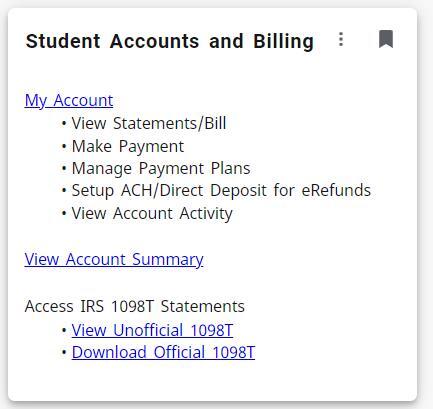
How Do I Access My 1098-T?

  • Students may log into my.ctstate.edu
  • Find “Student Accounts and Billing” card and
    • click on “View Unofficial 1098T” or "Download Official 1098T
      example of what the student accounts and billing card looks like on My CT State.

Students also have the option to view and download the 1098-T from the Maximus website. The link to the Maximus login page is https://tra.maximus.com. The student can create an account by clicking on First Time Students. Once the account is created, the student can then enter a User ID and Password and click on Loginwithin the main webpage.

Please note that we are unable to email or fax the form to anyone.

What is included in Box 1?

Box 1 includes the total amount of payments received for Qualified Tuition and Related Expenses that were billed between January 1 and December 31. Qualified tuition and fees do not include housing, food, insurance, medical expenses, transportation, and similar personal, living, or family expenses. The focus of Box 1 is on direct educational expenses necessary for enrollment and attendance at CT State. They include all payments from all sources, such as:

  • Individual cash, check and credit card payments
  • Payments from 529 and other investment accounts
  • Payments from third-party sponsors
  • Student loans
  • Grants and scholarships for Qualified Tuition and Related Expenses

Any refunds you received, waivers, or any payments made that were returned by the maker's bank are reflected as a reduction of these total payments.

Please be advised that amounts paiddo not represent amounts billedby CT State during the calendar year. The amount in Box 1 represents amounts paid and posted to your student account in the appropriate calendar year.

To ensure accurate reporting on your tax return, you should keep track of all payments you make toward qualified tuition and related expenses, even if they fall outside the calendar year covered by the 1098-T. You may need to manually include these payments when preparing your tax return for the relevant tax year.

What is included in Box 5?

Box 5 of Form 1098-T reports the total amount of scholarships or grants administered and processed by CT State for the calendar year. If Box 5 is higher than the amount you paid for qualified tuition and related expenses (reported in Box 1), it could be due to a few reasons:

  1. Timing Differences: Scholarships or grants may be processed and reported in the tax year, even if the corresponding tuition and related expenses were for a different academic term or semester. This timing difference could result in a situation where the scholarship or grant amount in Box 5 is higher than the qualified expenses in Box 1.
  1. Non-Qualified Expenses: Box 1 of the 1098-T form reports qualified tuition and related expenses. However, scholarships and grants reported in Box 5 may include funds that are not exclusively for qualified expenses. For example, if you received a scholarship that covers both tuition and books, the excess amount may be included in Box 5.

For questions regarding Form 1098-T that are not answered here, please contact your home campus bursar/business office.

  • Hits: 42748

Student Rights, Responsibilities and Policies

  • Temp Last Modified: 2024-12-16
  • Student Rights and Responsibilities

    As a student at a Connecticut State Community College, you have the right to:

    • Know what federal, state, and institutional sources of financial aid is available to you.
    • Know the financial aid procedure and how aid is awarded.
    • Know when and how financial aid is paid.
    • Know the cost of attendance at CT State.
    • Know and comply with the Return to Title IV policies and procedures for withdrawals.
    • Know what portion of financial aid is grant (or gift) aid.
    • Know what portion of financial aid is a loan, and the terms of the loan at the time it is made. This includes knowledge of your interest rate, grace period, and repayment terms.
    • Know how much need has been met by your financial aid award.
    • Know the criteria for continued eligibility for financial aid.

    As a student at a Connecticut State Community College, you are responsible for:

    • Knowing and meeting all posted financial aid deadlines.
    • Providing all information and/or documentation requested by the Office of Financial Aid Services.
    • Reading and understanding all forms and correspondence related to financial aid. This includes retaining copies for your records.
    • Accepting responsibility for all agreements signed by you.
    • Reporting any significant changes in financial circumstances, such as divorce or death of a family member, which may change your determination of financial need.
    • Returning all financial aid forms by the date requested.
    • Knowing and complying with all CT State payment policies.
    • Notifying your loan lender and CT State if you change your name, address, or enrollment status.
    • Complying with any and all conditions of employment under the work-study program.
    • Completing your financial aid application as soon after October 1 as possible.
    • Repaying all student loans as agreed upon.
    • Meeting the terms of the satisfactory academic progress policy to continue your financial aid eligibility.
  • Satisfactory Academic Progress Policy

    Federal regulations require that a student receiving financial aid under the Title IV programs make satisfactory academic progress (SAP) in accordance with the standards set by the Board of Regents, and the US Department of Education. In order to maintain eligibility for financial aid, students must be making satisfactory progress towards completion of their degree or certificate program. Recipients of financial aid under the Title IV programs, state aid and/or other financial aid programs directly administered or certified by the CT State colleges must meet the minimum SAP standards in order to continue to be eligible for aid. Some certificate programs are not eligible for financial aid and therefore the minimum SAP standards do not apply to students matriculating in those programs.

    We encourage you to review and become familiar with the SAP policy, which is located at https://www.ct.edu/policies/satisfactory-academic-progress-for-financial-aid-recipients. Questions concerning this policy may be addressed to Campus Supervisors of Financial Aid Services at the attending CT State campus.

    Please note, the SAP policy is not the same as the Academic Progress policy at your college.

    Satisfactory academic progress in eligible certificate and degree programs is determined using your cumulative academic history at the college, measured by your cumulative Grade Point Average to determine a qualitative measure and your cumulative pace of completion in your courses to determine your pace measure. All attempted credits at the college must be evaluated in the SAP calculation. This includes incomplete courses, course withdrawals, course repetitions, noncredit remedial courses (with appropriate credit equivalency evaluation), and ESL courses. Transfer credits are counted as both attempted and earned credits.

    The SAP standard if you are seeking a certificate is:

    Credits Attempted

    Minimum Cumulative GPA

    Minimum Completion Pace

    0 – 11.99

    0.0

    0.00%

    12 +

    2.0

    67.00%

    The SAP standard if you are pursuing a degree is:

    Credits Attempted

    Minimum Cumulative GPA

    Minimum Completion Pace

    0 – 11.99

    0.0

    0.00%

    12 – 30.99

    1.7

    50.00%

    31 – 49.99

    2.0

    50.00%

    50 – 59.99

    2.0

    60.00%

    60 +

    2.0

    67.00%

    For students falling below a cumulative GPA of 1.7 and/or a minimum completion pace of 50%, you will be required to meet with a member of the advising staff prior to registering for coursework in the next semester.

    If you are seeking to repeat a course that you have previously passed for a better grade, please be aware that federal law only permits us to pay for one repetition of a previously passed course. A second repetition of a previously passed course is not eligible for financial aid.

    You will receive notifications from the college regarding your SAP status in your college email account. You are also able to view your status at any time within your Self-Service Banner account.

    You may only receive financial aid for any attempted credits that do not exceed 150% of your program length. For example, if you are in a 60-credit program, you may receive financial aid for up to 90 attempted credits. Likewise, if you are in a 30-credit certificate program, you may receive financial aid for up to 45 attempted credits. This requirement applies to students who change programs and/or pursue double majors.

    If you do not meet the terms of the SAP policy, you will be placed on Financial Aid Warning. This status is only available to you one time during your academic career at our college. While on Warning, you may receive financial aid for one additional semester, which would be your next semester of enrollment. If you do not meet the terms of the policy a second time, your status will change to Unsatisfactory Progress, and you will become ineligible to receive financial aid. In order to get back into Satisfactory standing, you may pay for courses out of pocket. You may also be eligible to file an appeal to get back into Satisfactory standing.

    Appeals may be made for extenuating circumstances, such as the death of a family member, illness or injury, or other undue hardship. Submitting an appeal does not guarantee your reinstatement of financial aid. An appeal form is located in the Forms section of your college’s financial aid website.

    Your appeal with supporting documentation will be reviewed by a committee. If a successful appeal is made, you will be reinstated and placed on Financial Aid Probation on the condition that certain academic requirements be met to maintain eligibility. If your appeal is unsuccessful, you will remain ineligible for financial aid and will be responsible for any charges associated with your enrollment.

  • Return of Title IV Funds Policy

    The Office of Financial Aid Services is required by federal law to recalculate your eligibility for federal grants and loans if you withdraw, drop out, are dismissed, or take a leave of absence prior to completing 60% of the semester. This also includes if you unofficially withdraw, or stop attending your courses at will without officially notifying the college.

    The concept behind our policy is that both you and the college are allowed to retain only the amount of federal financial aid that is earned. If you withdraw or stop attending classes, whether any credit has been earned or not, a portion of the financial aid you had received is considered to be unearned and must be returned to the US Department of Education. Faculty are asked to monitor your engagement in your coursework throughout the semester as a means to determine your last date of participation in the event you stop attending classes or receive an F-grade, as this is the date that our office must use in the event you do not notify the college of your desire to formally withdraw. If you attend through 60% of the semester you are scheduled to attend, you are considered to have earned 100% of your federal financial aid.

    All students are required to demonstrate academic engagement in each of their registered courses no later than the “census” date of each semester. This is generally the 21st calendar day of each Fall and Spring semester. If you have not demonstrated engagement in all of your courses for a given period, you will be considered to have not started the term and will not be eligible to receive your financial aid. You will also be assigned a registration status of Never Participated (NP) for each course in the term.

    Academic engagement includes, but is not limited to:

    • Physically attending a class where there is an opportunity for direct interaction between the instructor and students;
    • Submitting an academic assignment;
    • Taking an exam, an interactive tutorial, or computer-assisted instruction;
    • Attending a study group that is assigned by the school;
    • Participating in an online discussion about academic matters; and
    • Initiating contact with a faculty member to ask a question about the academic subject studied in the course.

    This does not include activities where a student may be present, but not academically engaged, such as:

    • Logging into an online class without active participation; or
    • Participating in academic counseling or advising.

    The instructor in each of your courses is responsible for making the determination of academic engagement. Your self-certification of attendance or engagement is not acceptable unless it is supported by documentation from the school.

    If you are registered for courses that do not span the entire 15-week semester, there is important information you should be aware of. These types of courses are known as “modules.” This includes shortened courses in the Fall and Spring semesters, as well as summer and winter courses. If you withdraw from a module within the term but are still registered for other modular courses later in the semester, you are required to provide a written statement to the Office of Financial Aid Services that indicates your intention to return for your other classes. Without the statement, you will be considered withdrawn from all other courses and will be subject to the Return of Title IV funds calculation.

    Return of Title IV Funds Process

    Step 1

    The first step our office must take is working through a series of formulas to determine the amount of your financial aid that must be returned to the US Department of Education. Using your last date of participation as noted by your faculty or your official withdrawal date, we must determine the total number of days you attended and the total number of days you were scheduled to complete. Weekend days count in this calculation, but scheduled breaks of five days or more (such as Thanksgiving Break or Spring Break) do not. The days you attended are divided by the days you were scheduled to attend. This percentage is then multiplied by the total aid you were eligible to receive, which determines the amount of financial aid you earned in the term.

    Total Aid – Earned Aid = Unearned Aid (aid to be returned)

    Step 2

    We then need to determine the total amount of institutional charges that you were billed (your tuition and fees, and if you used your financial aid at the college bookstore, the amount you spent). The amount of institutional charges is multiplied by the percentage of unearned aid.

    Institutional Charges x % of Unearned Aid = Amount Returned by the School

    Our office must then return the amount of your unearned federal financial aid to each of the Title IV programs in the following order:

    1. Federal Direct Unsubsidized Loan
    2. Federal Direct Subsidized Loan
    3. Federal Direct PLUS Loan
    4. Federal Pell Grant
    5. Federal Supplemental Educational Opportunity Grant (FSEOG)

    Step 3

    We are then required to calculate the amount for which you are responsible by subtracting the amount returned by the school from the amount that is unearned. That remaining amount is your share and is allocated in the same order as above.

    Total Amount Unearned – Amount Returned by the School = Your Responsible Amount

    Once we determine the dollar amount and which federal programs must be repaid, you will be notified in writing, which will include any amount you owe. Funds that must be returned by the student to any of the loan programs can be paid in full in accordance with your loan repayment terms on your Master Promissory Note. For grant dollars that need to be repaid, you will have 45 days to make repayment only for amounts that exceed $50. Any unpaid balances are turned over to the US Department of Education, and may impact your ability to receive future federal financial aid.

    This policy on Return of Title IV Funds is separate from our policy on Refund and Course Withdrawals, which may be found at https://www.ct.edu/files/pdfs/3.7-refund-policy.pdf.

    Before withdrawing, or choosing to stop attending your courses, it is important you understand these policies so that you understand what consequences may occur. Officially withdrawing is always your responsibility, and may be done in the Registrar’s Office.

    We understand this is a complicated process. If you are unsure of what the impact to your financial aid might be, anyone in the Office of Financial Aid will be more than happy to assist you.

  • Hits: 55161

Student Forms

  • Temp Last Modified: 2025-05-06
Image Form Name Department Text 2 Text 3 Text 4 Text 5 Text 6 Text 7 Text 8 Text 9 Text 10 Text 11 Text 12 Text 13 Text 14 Text 15 Text 16 Text 17 Text 18 Text 19 Text 20 Link

Academic Fresh Start Program Application

Enrollment Services

b

b

Additional Financial Information • PARENTS (2025-2026)

Financial Aid

Additional Financial Information • STUDENTS (2025-2026)

Financial Aid

Affidavit of Support

International Students

Aid Application for CT Undocumented Students (AACTUS) (2025-2026)
Aid Application for CT Undocumented Students (AACTUS) (2026-2027)

Solicitud de Ayuda para Estudiantes Indocumentados de Connecticut (AACTUS) (Español, 2025-2026)
Solicitud de Ayuda para Estudiantes Indocumentados de Connecticut (AACTUS) (Español, 2026-2027)

Financial Aid

Audit Request

Enrollment Services

Change of Address or Phone Number

Enrollment Services

Change of Legal Name

Enrollment Services

Change of Residency Request Form

Enrollment Services

Change or Declaration of Program

Enrollment Services

Confirmation of Future Attendance Form

Financial Aid

Consortium Agreement Form

Financial Aid

Dependency Override Request Form (2025-2026)

Financial Aid

Dependent Verification Worksheet (2025-2026)

Financial Aid

Documentation of Disability Form

Disability and Accessibility Support

Federal Work-Study Application (2025-2026)

Financial Aid

Honors Program Application

Honors

Housing Plan Letter

International Students

I-20 Extension Request Form

International Students

I-485 Permanent Resident Decision Form for F-1 Students

International Students

Immunization Form

Enrollment Services

Independent Verification Worksheet (2025-2026)

Financial Aid


Instructions for Providing Income and Tax Information (2025-2026)

Financial Aid

International vs Non-International Admission Application?

International Students

New Student Online Orientation Login Instructions

Enrollment Services

Optional Practical Training (OPT) Request Form
Optional Practical Training (OPT) Flyer

International Students

Preferred First Name Request

Enrollment Services

Registration and Add Drop Form

Enrollment Services

Request for Revocation of Non-Disclosure of Directory Information

Enrollment Services

Request to Amend or Remove Education Records

Enrollment Services

Request to Opt Out of Directory Information

Enrollment Services

Request to Review Education Records

Enrollment Services

Revocation of Student Information Release Authorization

Enrollment Services

Student Information Release Authorization

Enrollment Services

Title IV Authorization Instructions

Financial Aid

Transcript Request Form

Enrollment Services

Withdrawal Form

Enrollment Services

Enrollment Services

Workforce Development Course Registration Form

Workforce Development and Continuing Education

International Students

SNAP E&T Assessment and Employment Plan

Workforce Development and Continuing Education

F-1 Status Verification Form

International Students

  • Hits: 96883